CardPointe

Overview
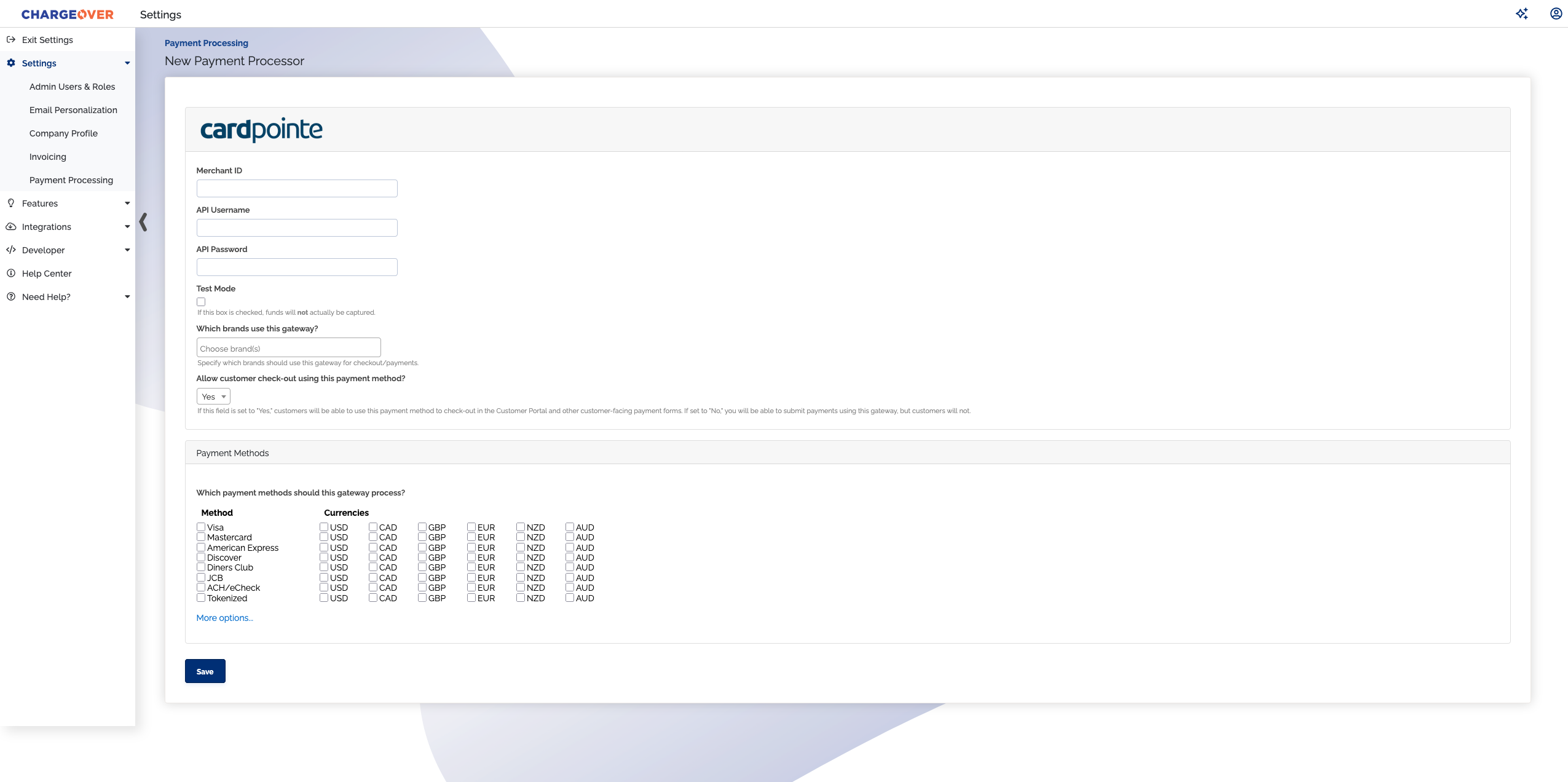
ChargeOver supports connecting to CardPointe to process your credit card and ACH payments.
How to Connect
In CardPointe
Reach out to CardPointe to receive Merchant ID, API Username, and API Password
In ChargeOver
- Go to Settings then
Payment Methods - Click
Add or Configure a Payment Method or Merchant Account - Select CardPointe from the options
- Enter in your Merchant ID, API Username, and API Password
- Scroll to the next section and designate which payment types you accept. For example, Visa, Mastercard, ACH/eCheck and more.
- Click
Save when finished
Common questions
Does the integration between CardPointe and ChargeOver support…
| Feature | Supported? |
|---|---|
| Dynamic Statement Descriptors | ✅ |
| Tokenized Payments | ✅ |
| Credit Card Payments | ✅ |
| ACH (USA Only) Payments | ✅ |
| EFT (CAD Only) Payments | ✖️ |
| ACH (AUS Only) Payments | ✖️ |
| Credit Card Refunds | ✅ |
| ACH Refunds | ✅ |
Can CardPointe send multiple ACH or EFT payments into a single settlement batch?
✅ Yes! CardPointe does this automatically!
Can CardPointe report ACH payment status' to ChargeOver?
✅ Yes!
Does CardPointe support same-day refunds for credit cards and ACH?
✖️ CardPointe supports same-day refunds for credit cards, but not for ACH.
Supported currencies
CardPointe supports most currencies. Merchants requiring additional currencies can be setup as needed with CardPointe.
Supported merchants countries
The United States and Canada.
Common decline messages
If you are unsure what a CardPointe decline message means or what to do next, the most common error messages you might encounter are explained below.
| Error Message | What CardPointe is Trying to Tell You | Next Steps |
|---|---|---|
| ERR_DECLINE | CardPointe told ChargeOver the payment was declined. | You or the customer should contact CardPointe to discuss the reason for the decline. |
| ERR_CREDENTIALS | CardPointe told ChargeOver that your authentication credentials for Forte are incorrect. | You should contact CardPointe and fix the credentials you use to connect to them. |
| ERR_EXPIRED | CardPointe told ChargeOver the credit card has expired. | You should contact the customer and ask them to provide a new payment method. |
| ERR_CVV | CardPointe told ChargeOver the credit card was declined due to an incorrect CVV/CVC security code. | Your customer should provide a correct CVV/CVC security code, or provide a new payment method. |
| ERR_CREDITCARDNSF | CardPointe told ChargeOver the credit card was declined because the provided card does not have enough available funds to cover the transaction. | Your customer should make sure that there are sufficient funds availalbe and that there are no holds or restrictions on the card, or provide a new payment method. |
CardPointe Support
If you need to contact CardPointe's support team, you can use the information below.