Terms and Conditions Consent Report
Overview
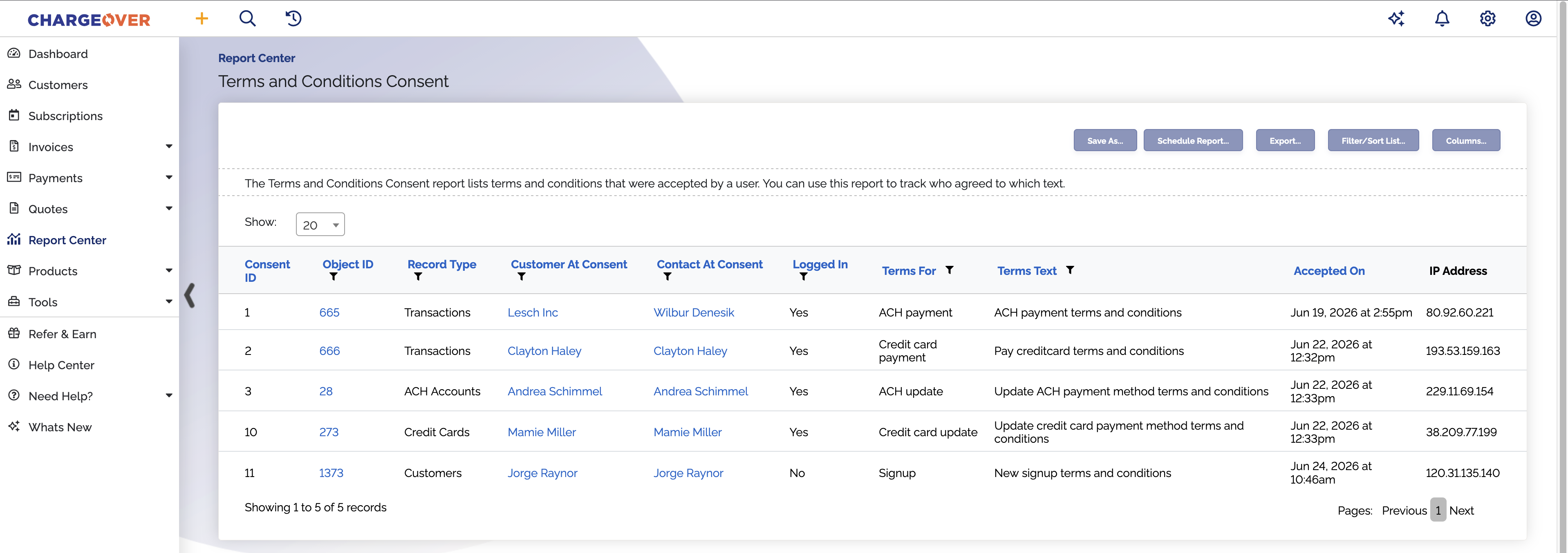
The Terms and Conditions Consent report shows traking information for terms and conditions. This report is useful for tracking proof of authorization for your terms and conditions. You can use this report to track who accepted terms and condtions, when they were accepted, and the text of the terms and conditions that were accepted.
To use this report, filter by columns. You can also add or subtract columns including custom fields, using the
Where is this report?
- Find your Report Center tab and click into it
- The Terms and Conditions Consent report can be found under the Logs heading
Popular columns to use
- Object associated with the terms and conditions
- Customer at consent - the customer name when the terms and conditions were accepted
- Contact at time of consent - the customer's primary contact name or the logged in user's name when the terms and conditions were accepted
- Logged in - whether or not the user was logged in
- Terms for - what object or action the terms and conditions are for
- Terms text - the text that the user accepted
- Accepted date - the date and time of consent
What your report might look like